Greetings Watchers,
The PC Controller Support Public Test for Pillars of Eternity and Pillars of Eternity II: Deadfire is now live on XBOX on PC, Steam, and GOG.
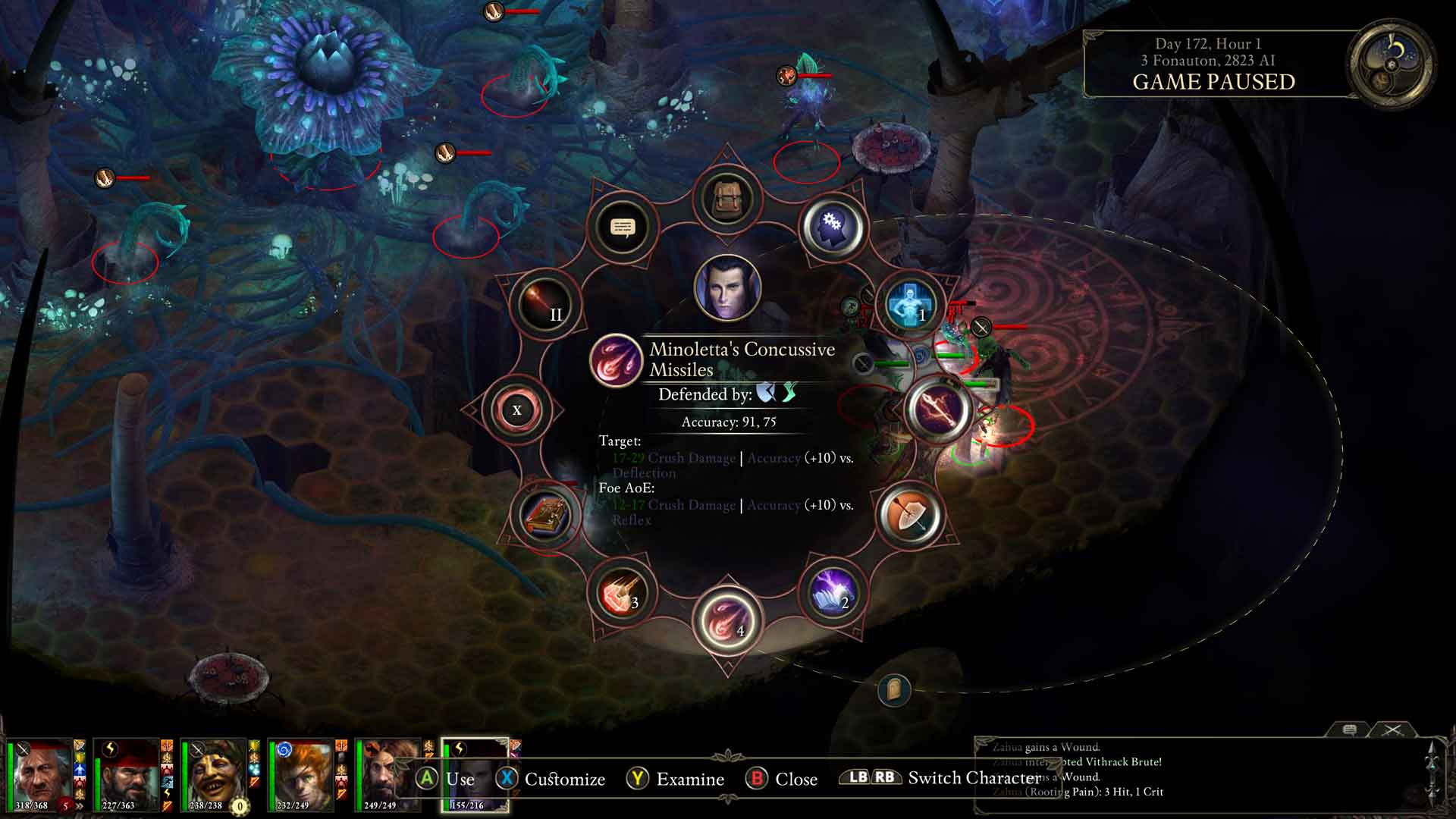
You can now play the whole of either game with a controller, from character creation to the end credits (and, in Deadfire, all the way out to naval combat), in both Real-Time with Pause and Turn-Based Mode. Deadfire’s support builds on the controller scheme from the console editions. Prefer to switch things up? Pick up your mouse and keyboard at any time, and the game follows right along.
Deadfire’s Turn-Based Mode has also been reworked with the improvements we made for Pillars of Eternity’s Turn-Based Mode: turns now follow each character’s speed, combat is more lethal, and swapping weapons or drinking potions no longer costs your action. You can now switch Turn-Based Mode on or off during a playthrough, and the update brings a long list of fixes across combat, quests, audio, and the interface.
As a reminder:
- This is a public test, so please expect bugs.
- The public test will run for some time as we continue to update it in preparation for a full release.
- We’ll be collecting your reports, issues, and suggestions throughout the test and doing our best to integrate that feedback into the final version.
How to access the Public Test:
Steam
- In your Steam Library, right-click Pillars of Eternity or Pillars of Eternity II: Deadfire and select “Properties.”
- Select the “Betas” tab, click the drop-down labeled “None,” and select “public_beta.”
- Close the window, and you should have a download ready. Launching the game should automatically trigger the download. If you don’t see the update, please restart your Steam client.
GOG
- In your game Library, Right click on Pillars of Eternity and go to "Manage Installation" -> Configure
- In "Beta Channels" select Public Beta
- Select "OK" and you should have a download ready.
XBOX on PC
- Sign-in on your Windows PC and launch the Xbox Insider Hub app (or install the Xbox Insider Hub from the Store first if necessary)
- Navigate to Previews > Pillars of Eternity – Hero Edition
- Select Join
- Wait for the registration to complete and be directed to the Store and install Pillars of Eternity – Hero Edition
If you have an issue or want to share feedback, please contact us at support.obsidian.net or join our official Discord Server and help us shape the update together.
As always, thank you for your continued support and for being part of these adventures in Eora with us. We’re thrilled to bring controller support to both games and can’t wait to see what you think.
Steam Deck
Players on Steam Deck will need to enable the controller configuration by following the steps below.
- Open your Steam Library on your Steam Deck.
- Navigate to the Pillars of Eternity or Pillars of Eternity II: Deadfire.
- Select the Controller icon (gamepad icon) on the game's library page.
- Select your Current Layout to open the layout selection screen.
- Navigate to Templates.
- Select Gamepad with Joystick Trackpad or Gamepad if the first option isn't available.
- Select Apply Layout to save the configuration.
- Launch game and verify that the controller inputs are working correctly.
Pillars of Eternity – Patch 1.3.10.0
Major Features
- Controller support has been added to Pillars of Eternity!
- The whole game can be played with a controller, including character creation, exploration, combat in Real-Time with Pause and Turn-Based Mode, conversations, the inventory, crafting and enchanting, the Stronghold, and the world map.
- Radial menus give quick access to abilities, spells, and party commands, and button prompts are shown throughout the interface.
- Switch between a controller and mouse and keyboard at any time; the interface and button prompts follow the input you’re using.
- Xbox and PlayStation controllers are supported, as are Steam Deck and Steam Big Picture mode, including the on-screen keyboard for naming characters and writing notes.
Combat and Mechanics – Turn-Based Mode
- Spells that enter the turn order now tick correctly before the caster’s first turn after casting.
- DR Bypass is now applied to the attack that starts a battle in Turn-Based Mode.
- Barbarians no longer get stuck in an attack state that prevents ending the turn when Blood Thirst and Carnage trigger at the same time.
- The camera no longer stays focused on the space between the active character and their last target.
Combat and Mechanics – General
- Concelhaut’s Parasitic Staff can no longer be looted from enemies who died after using the spell.
User Interface and Interaction
- The Stronghold’s Party Management window can no longer be opened repeatedly while the party is away from the Stronghold.
- Descriptions on the Stronghold – Upgrades screen no longer overlap the upgrade requirements.
- Character names can now be entered with the on-screen keyboard on Steam Deck.
- The description of Fulvano’s Boots is no longer fragmented.
- The description of Measured Restraint no longer contains a redundant line break.
Pillars of Eternity II: Deadfire – Patch 5.1.0.0
Major Features
- Controller support has been added to Pillars of Eternity II: Deadfire!
- The whole game can be played with a controller, including character creation, exploration, combat in Real-Time with Pause and Turn-Based Mode, conversations, the inventory, the world map, and naval exploration and ship combat.
- Radial menus and action bars give quick access to abilities, spells, items, and party commands, and button prompts are shown throughout the interface.
- Switch between a controller and mouse and keyboard at any time; the interface and button prompts follow the input you’re using.
- Xbox and PlayStation controllers are supported on Windows, macOS, and Linux, as are Steam Deck and Steam Big Picture mode, including the on-screen keyboard for naming characters and writing notes.
- Turn-Based Mode (TBM) has been reworked with the improvements made for Pillars of Eternity’s Turn-Based Mode!
- Turns are now influenced by character speed, combat pacing has been adjusted for increased lethality, and certain actions (such as swapping weapons, drinking potions, or enabling modals) are now classified as free actions with per-turn limits.
- Turn-Based Mode can now be turned on or off during a playthrough while outside of combat, from the game options, a new HUD button, or the T key.
Combat and Mechanics – Turn-Based Mode Rework
- TBM turns have been reworked from Deadfire’s original Turn-Based Mode:
- Characters no longer take one turn per round. Instead, characters take turns as frequently as their Initiative (based on RTwP Recovery) allows.
- Faster characters (high Dexterity, lighter armor, and/or speed-improving effects) may take multiple turns each round, while slower characters may act less or even skip an entire round if encumbered by enough speed penalties.
- As Dexterity now determines how often characters take turns, it no longer also grants a Stride bonus in TBM.
- TBM lethality has been significantly increased:
- In addition to Deadfire’s existing lethality changes (increased Graze Range, reduced Miss Range, Basic attacks performing Full Attacks, etc.), TBM now increases damage dealt by any source by 35% globally.
- This change helps keep combat moving forward and highlights careful tactical decision-making.
- TBM Intellect has been reworked vs. RTwP:
- The effect of Intellect on duration in TBM has been increased from +/- 5% → 10% per point.
- TBM Initiative has been reworked:
- First-turn initiative uses a default recovery of 4s.
- A character’s initiative can never be below 1.
- TBM Free Actions have been reworked:
- Swapping weapon sets, drinking potions, and toggling modals (or switching within a modal group) are now all considered free actions.
- Each Free Action type is now limited to one activation per turn.
- E.g. you may drink a potion and change your active modal, but you may not drink two or more potions in the same turn, or change modal → attack → and then change it back.
- Additionally, no individual Free Action may be activated more than once in a turn.
- Free actions and consumables already used this turn now show “Already activated,” and abilities show “Action used” once the turn’s action is spent.
- Swapping weapon sets, drinking potions, and toggling modals (or switching within a modal group) are now all considered free actions.
- TBM Phrase progression has been reworked:
- As turns are no longer bound to one per round, phrases no longer progress one phrase per turn.
- Phrases now progress based on the amount of initiative (recovery) that has elapsed since the Chanter’s last turn (or the start of combat).
- TBM Interrupt mechanics have been reworked:
- Successful interrupts add their interrupt value to the Initiative of the victim’s next turn, effectively pushing their turn back.
- Interrupt values in TBM have been increased over their RTwP equivalents.
- A successful interrupt can still cancel a victim’s pending spell casts.
- Prone status in TBM now adds an additional 3 initiative delay to the victim.
General
- Completed-game saves from Pillars of Eternity can now be transferred to Pillars of Eternity II: Deadfire.
- Continue and Load Game on the title screen no longer fail to load a save.
- The game no longer crashes after searching the Old Battleground near Tikawara.
- The game no longer becomes unresponsive after Aloth uses Llengrath’s Warding Staff during a ship battle.
- The game no longer crashes when a hostile Form of the Helpless Beast ends on a character wearing a Strand of Favor.
- The game no longer crashes when an object or character is destroyed by Mohorā Tanga.
- Using Charge against Porokoa no longer crashes the game.
- A loading error no longer blocks entering a map after dead party members were left inside it.
- The water level in the Drowned Kingdom is now kept after saving and loading.
- The Free DLC icon on the main menu now shows the full list of DLC.
- Portraits from the Critical Role Pack now correctly require the DLC.
Quests
- The Goods and Services quest can now be continued after ignoring it to follow the Principi questline.
- The scripted interaction with the statue in the Chamber of Waves during The Cornett’s Call can now be started.
- Using Abjuration on the Tyrant of Decay in the Crucible no longer breaks quest progression.
- Hunting Season no longer auto-completes an objective and fails after the Royal Deadfire Company questline is locked out.
- Leaving the Workshop in Sayuka no longer leaves the map in a broken state after the Royal Deadfire Company questline is locked out.
- The scripted interaction in Bent Bough Forest can no longer be repeated by attacking the cultists right after they devour Audr.
- Neketaka guards no longer turn hostile during the fights with Katrenn and Lord Admiral Imp in Turn-Based Mode.
- Figures in the Engwithan Digsite now highlight when hovered over.
Combat and Mechanics – Turn-Based Mode
- Shining Beacon now affects every enemy in its area.
- Maura’s Writhing Tentacles, Whispers of the Wind, Twinned Shot, Scyorielaphas’s Ocean’s Lash, and the enemy Sound Alarm ability no longer cause a long wait before the next turn.
- Enemies using Escape no longer get stuck in an animation loop.
Combat and Mechanics – General
- Lower Their Guard, Deadly Surprise, Takedown Combo, Retribution, and Wizard’s Double now end after one attack as intended, instead of two.
- The Drawing Cut enchantment of Duskfall and the Veteran’s Maneuver enchantment of Saint’s War Armor now expire after the intended number of hits.
- The untargetable effect of Shadowed Hunters now ends after the first attack, for both the ranger and the animal companion.
- The Dug-in enchantment of Wahai Pōraga and the monk’s Blade Turning now end on the first movement command.
- Weakness afflictions no longer retrigger repeatedly and cause severe frame rate drops.
- Switching weapon sets quickly no longer leaves several weapon proficiencies active at once.
- Casting spells while in Spiritshift: Stag no longer leaves the druid frozen and unresponsive.
- Damage-over-time effects now count toward the soulbound upgrades of Marux Amanth.
Visual and Audio
- Capes now display correctly on the paper doll and on characters with the female body type.
- Berath’s and Rinco’s interaction circles now line up with their models.
- Parts of the Scyorielaphas and Vithrack Brute models no longer flicker.
- Soul Collector animations now play at full frame rate.
- The Lagufaeth Broodmother now returns to the water during the cutscene in Hōhina Ravine, and Savia now walks up to the cell during The Drunk Sailor.
- The wind effect pulling the Messenger during its revival in Harbingers’ Watch is no longer oversaturated and blurred.
- The icon background of some soulbound items no longer changes color when the item is equipped.
- The Oculus security beam now plays its sound effect.
- The howling wind while climbing with the icepicks in Harbingers’ Watch no longer loops until the game is restarted.
- The first line of dialogue with the whirling vortex in the Temple of Revelation now has its audio.
User Interface and Interaction
- The End Turn and Delay Turn buttons now show their keybindings in their tooltips.
- The Turn-Based Mode initiative window can no longer be moved off screen at lower resolutions.
- Retraining a character through a port vendor now opens the Level Up screen.
- Status notifications no longer disappear and stop updating after visiting the City or World Map.
- Minimizing the game during a conversation with a single dialogue option no longer replaces it with an error message.
- NPC bark text no longer stays on screen in the main menu after quitting.
- A “[Missing string -1]” tooltip no longer appears on some buttons in confirmation windows.
- A “Missing String” entry no longer appears in the companion relationship log after desecrating the shrine at Teo Ramunga.